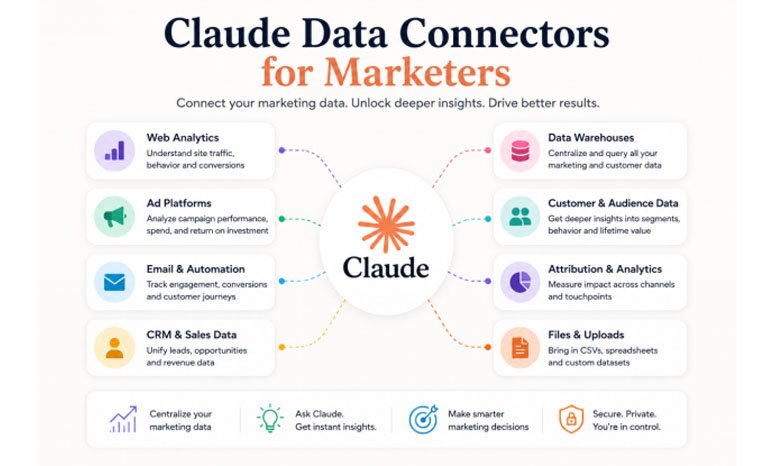
Claude is a great AI assistant. It can write copy, brainstorm ideas, and help with strategy. But when it comes to your actual marketing data, it doesn’t know anything unless you give it something to work with.
That’s what makes data connectors so valuable. They let Claude pull information directly from the tools you already use.
Not all connectors are built for marketers, though. In this article, we’ll focus on the ones that are most helpful if you run campaigns, manage leads, or publish content.
Let’s go through the best ones.
1. Google BigQuery
BigQuery is Google’s data warehouse, and it’s where a lot of marketing teams store their campaign data, web analytics, and attribution reports. If your company already uses it, this connector is a big deal.
With the BigQuery MCP server, Claude can run queries on your datasets using plain language. You don’t need to write SQL yourself. Claude figures out the query, runs it, and gives you the result in a way that’s easy to read and act on.
The setup is a bit more technical than the other tools on this list. You’ll need a Google Cloud project and a service account. But once it’s connected, it’s incredibly powerful for performance reviews and cross-channel reporting.
If your marketing data already lives in BigQuery, this connector turns Claude into something close to a personal analyst.
2. Airtable
A lot of marketing teams use Airtable to manage campaigns, track content calendars, or organize creative briefs. It’s flexible, easy to use, and keeps everything visible.
Airtable released an official MCP server in early 2026, and it works on all plan tiers, even the free one. You don’t need an API key. The whole thing connects through Claude’s OAuth flow, and setup takes about five minutes.
Once it’s linked, Claude can browse your bases, search records, create entries, and update fields. So instead of opening Airtable every time you need to check something, you just ask Claude. It reads from your actual data and gives you the answer right in the conversation.
If Airtable is already part of how your team works, this is one of the fastest connectors to set up and one of the most useful day to day.
3. Coupler.io
Coupler.io is the only one no-code data integration and AI analytics platform in this list that helps marketers connect data directly to Claude through its AI integrations. Instead of exporting CSV reports or manually combining datasets, Claude can access fresh marketing data from your connected tools automatically.
This is especially useful for teams that work across multiple platforms. Advertising data, CRM records, ecommerce metrics, and analytics reports can all be centralized and made available to Claude in one workflow.
Coupler.io supports Claude data connectors for Google Ads, Meta Ads, HubSpot, Google Analytics, Shopify, and many others. Once connected, the platform prepares data and refreshes it on schedule in the background, so Claude works with updated and structured datasets instead of raw exports.
For marketers, this removes a major bottleneck in analysis — data organization and transformation. Claude can review cross-platform campaign performance, identify trends, compare channels, or answer reporting questions without requiring manual uploads each time.
4. HubSpot
HubSpot is one of the most popular CRMs for marketing and sales teams, and it has an official Claude connector. The setup uses OAuth — you log in, authorize access, and you’re done.
Once connected, Claude can see your contacts, deals, pipeline data, and engagement history. It pulls directly from your live HubSpot records, so you get real answers based on what’s actually happening in your CRM.
HubSpot admins control access through the integrations settings, so nothing gets shared without permission. The connector works on paid Anthropic plans: Pro, Max, Team, or Enterprise.
If your team already lives in HubSpot, this connector gives Claude the context it needs to help with real marketing and sales decisions.
5. Clay
Clay is a data enrichment platform that’s popular with go-to-market and account-based marketing teams. It helps you research companies, enrich prospect lists, and build targeted outreach.
The Clay MCP connector gives Claude access to the enrichment data in your Clay workspace. It’s useful for pulling details about target accounts, understanding who runs marketing at specific companies, or working through data across a list — all through a conversation.
Right now, it’s most useful if your team already relies on Clay for research and prospecting. If you’re running ABM campaigns, connecting Clay to Claude adds a nice speed boost to the process.
6. WordPress
WordPress added MCP support through its Abilities API in version 6.9. Once you configure it, Claude can read and interact with the content on your site.
For content marketers, this is a practical addition. Claude can check your published posts, review metadata, and help you spot content that needs updating or refreshing. It’s like giving Claude a map of your entire content library.
Setup is a bit more hands-on — you’ll need to edit Claude’s MCP config file and point it at your WordPress instance. But if your team publishes regularly, having Claude connected to your site saves time every week.
Final Thoughts
You don’t need all six connectors at once. Start with one, whichever matches your biggest pain point.
If you need a contextual, reliable analysis of marketing data, Coupler.io and Claude will enable it for you without heavy setup. If you need CRM context, HubSpot connects in minutes. Airtable is the fastest setup if your team already tracks campaigns there. BigQuery gives you the most power if your data lives in a warehouse. Clay is worth connecting if you’re doing account-based outreach, and WordPress makes sense for any team that publishes content regularly.
The main idea is the same for all of them: when Claude has access to your real data, it stops giving generic answers and starts giving useful ones. That’s when it becomes a tool you actually rely on, not just something you chat with.
FAQs
What is a data connector for Claude?
A data connector links Claude to an external tool, like your CRM, data warehouse, or content platform, through something called MCP (Model Context Protocol). Once connected, Claude can read and work with your data directly, without you exporting or uploading anything manually.
Do I need technical skills to set these up?
It depends on the connector. Airtable, HubSpot, and Coupler.io connect through a simple login flow that takes a few minutes. BigQuery and WordPress require a bit more configuration, but nothing that needs a full development team.
Is my data safe when I connect it to Claude?
Every connector on this list uses authentication, and you control what Claude can access. HubSpot and Airtable let admins manage permissions through their settings. Your data isn’t shared without your authorization.
Can I use more than one connector at the same time?
Yes. Claude supports multiple MCP connections at once. You can have HubSpot, Airtable, and Coupler.io all connected in the same setup and switch between them depending on what you need.
Which connector should I start with?
It depends on where your biggest gap is. If your data is scattered across platforms, Coupler.io brings it together. If you need CRM data in your conversations, go with HubSpot. If your team manages work in Airtable, that’s the fastest one to set up.